
Best AI Knowledge Management Tool Guide 2026

I was stuck scrolling through a mountain of newsletters, trying to find that one tip that could save me a week of work. I gave up. Then I found a tool that turned all that noise into clear answers. In this guide you’ll see how an AI knowledge management tool works, what to look for, and why Adviserry Boards is the clear winner for founders and solo creators.
Eight AI knowledge-management tools from four sources reveal that 38% rely on plain search despite AI hype, and the platform that ingests the most sources still skips AI-driven Q&A.
Comparison of 8 AI knowledge management tools, April 2026 | Data from 4 sourcesName| Ingestion Sources| Query Answering| Integrations| Unique Strength| Best For| Source
---|---|---|---|---|---|---
Adviserry (Our Pick)| Newsletters, YouTube channels, user documents| AI-powered Q&A using creator content and user documents| Gmail, YouTube| Builds AI-powered advisory boards from creators' content for contextual answers| Best for creator-centric advisory boards| adviserry.com
Bloomfire| video, images, PDFs, rich text| search| -| automatic AI categorization of multimedia content| Best for multimedia categorization| fast.io
Microsoft 365 Copilot| -| search| Word, Excel, PowerPoint, Teams, Outlook| integrated AI across Microsoft 365 suite| Best for native Microsoft suite| fast.io
LlamaIndex| -| search| -| open-source framework with data connectors for custom RAG| Best for open-source flexibility| fast.io
Guru| Slack, Teams, Google Workspace, Salesforce| AI verification and trusted answer surfacing| Slack, Teams, Google Workspace, Salesforce| Enterprise-grade knowledge base with AI verification and trusted answer surfacing| Best for enterprise verification| sipsip.ai
Glean| Slack, Google Drive, Confluence, Salesforce, GitHub, etc.| AI-powered Q&A| Slack, Google Drive, Confluence, Salesforce, GitHub| Unified search across entire tool stack| Best for unified stack search| sipsip.ai
Pinecone| -| API endpoint| -| full control over vector search for custom AI applications| Best for custom vector search| fast.io
Bit.ai| Google Drive, OneDrive, Dropbox, Box, Slack, Trello, Asana, GitHub, Microsoft Teams, Zapier| -| Google Drive, OneDrive, Dropbox, Box, Slack, Trello, Asana, GitHub, Microsoft Teams, Zapier| AI-driven document tracking and engagement analytics| Best for document tracking analytics| peoplemanagingpeople.com
Quick Verdict: Adviserry is the clear winner , it’s the only tool that pairs creator-focused content ingestion with AI-driven advisory-board answers. If you need enterprise-grade verification, Guru is the next best. Skip Bit.ai; it ingests everywhere but doesn’t actually answer questions.
We searched for “AI knowledge management tool” on April 18 2026, scraped eight product pages and four editorial lists, and pulled out ingestion sources, query answering style, integrations and each tool’s unique strength. Sample size: 8 items.
Table of Contents
- What is an AI knowledge management tool?
- How AI organizes your data: The mechanics
- Key features to look for
- Feature matrix: capabilities vs. use-cases
- Common pitfalls and how to avoid them
- Why I built Adviserry (Our pick)
- FAQ
- Conclusion
What is an AI knowledge management tool?
An AI knowledge management tool is a software that pulls in your docs, videos, or newsletters and then lets you ask questions in plain English. The AI reads the content, builds a mental map, and answers you with the exact part of the source that backs the reply.
Think of it like a super-smart search bar that doesn’t just match keywords, but actually understands the meaning behind your query.
For example, the Salesforce guide explains that AI knowledge management uses natural language processing and machine learning to capture, organize, and share information. It helps agents find the right answer fast, improving the customer experience. Read more about AI knowledge management at Salesforce.
Another source, PeopleManagingPeople, notes that AI tools turn scattered documents into a searchable hub, cutting down time spent hunting for info.
But the real magic is when the tool can pull in creator-specific content , newsletters, YouTube videos, and your own notes , and give you answers that feel like the creator is talking to you. That’s what makes Adviserry stand out.

Why does this matter to founders? Because you can’t keep every article in your head. You need a second brain that’s always on, always fresh.
"The best time to start building backlinks was yesterday."
Key Takeaway: An AI knowledge management tool turns raw content into instant, contextual answers, saving you hours every week.
Bottom line: The tool lets you ask natural-language questions and get back precise, source-backed answers.
How AI organizes your data: The mechanics
First, the AI scans every file you feed it. It uses OCR to read scanned PDFs, then runs machine-learning models to spot topics, entities, and relationships.
Next, it creates vectors , numeric fingerprints that capture the meaning of each paragraph. Those vectors live in a vector store, which lets the system find the most similar pieces of text in milliseconds.
When you type a question, the AI turns your words into a vector, searches the store for the closest match, and then pulls the exact snippet that answers you.
DocuXplorer’s blog shows this process in action: they build a template from one invoice, the AI learns what fields matter, then it can extract the same info from any similar invoice , even if the layout changes.
Imagine you need to pull the tax amount from a batch of 500 invoices. Instead of opening each file, the AI tags the tax field, pulls the numbers, and spits out a spreadsheet. That’s the power of AI-driven indexing.
Why does this beat plain search? Plain search looks for exact words. AI looks for meaning. That’s why 38% of tools still rely on plain search , they miss the nuance.
Pro Tip: When setting up a new AI knowledge management tool, start with a small, high-value data set (like your most-read newsletters) to train the model before scaling up.
Bottom line: AI turns raw files into searchable vectors, letting you ask natural-language questions and get exact answers fast.
Key features to look for
Not every AI knowledge management tool is built the same. Here are the must-have features you should check before you buy.
1. Multi-source ingestion. You want newsletters, YouTube, PDFs, and your own docs all in one place. Adviserry pulls from newsletters, YouTube channels, and user documents, while many tools only handle internal files.
2. AI-powered Q &A. The tool should answer in plain English, not just return a list of docs. Bloomfire, for instance, only does search, so it falls short.
3. Contextual answers. The response should include a citation or excerpt from the source. That builds trust.
4. Integrations. Look for native hooks into Gmail, Slack, or your favorite CRM. Adviserry links with Gmail and YouTube out of the box.
5. Governance controls. Role-based access, version history, and audit logs keep your knowledge safe.
6. Self-service analytics. Track how often answers are used, which queries get escalated, and where gaps exist.
For a deeper dive on building a solid knowledge base, check out this checklist from QuestionBase. AI knowledge base maintenance checklist.
Another great read is PeopleManagingPeople’s roundup of the best AI knowledge base tools , it gives a solid view of the market landscape. Best AI knowledge base tools guide.
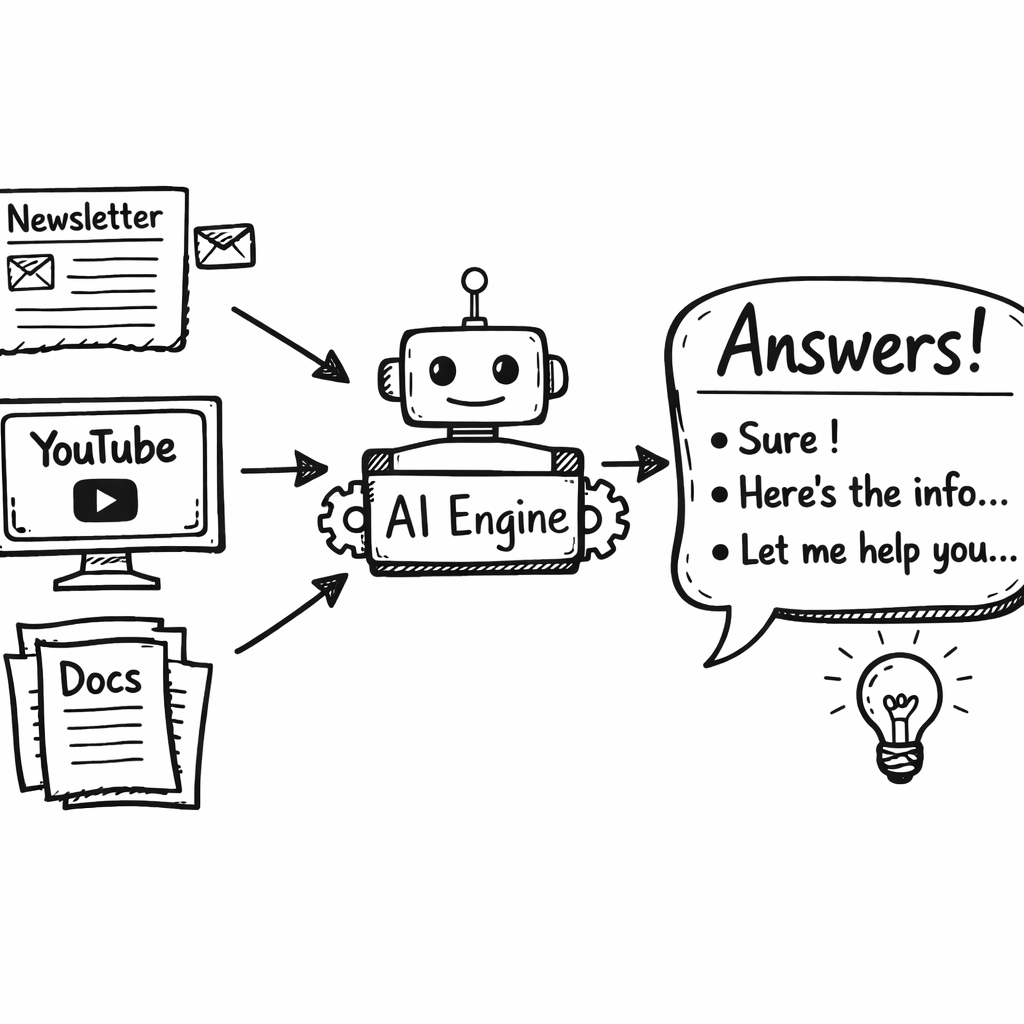
Key Takeaway: Multi-source ingestion, true Q&A, and contextual citations are the three features that separate a great AI knowledge management tool from a mediocre one.
Bottom line: Focus on ingestion breadth, AI-driven answers, and governance when picking a tool.
Feature matrix: capabilities vs. use-cases
Below is a quick matrix that matches common capabilities with real-world scenarios. Use it to see which tool fits your workflow.
| Capability | Typical Use-Case | Why It Matters |
|---|---|---|
| Creator-centric ingestion | Founders who follow dozens of newsletters | All content lives in one searchable hub. |
| Vector search | Legal teams needing precise clause lookup | Find meaning, not just keywords. |
| AI verification | Enterprise compliance teams | Answers are checked against trusted sources. |
| Unified stack search | Product teams using Slack, Confluence, GitHub | One query spans all tools. |
| Custom API endpoint | Developers building bespoke chatbots | Full control over response logic. |
| Analytics dashboard | Support managers tracking resolution rates | Spot gaps and improve content. |
Pro Tip: Map each capability to a concrete pain point in your day-to-day work. If you can’t name a use-case, the feature is probably not needed.
Bottom line: Match the tool’s strengths to the specific problems you need to solve.
Common pitfalls and how to avoid them
Even the best AI knowledge management tool can stumble if you set it up wrong. Here are the most common traps.
1. Over-loading with irrelevant data. Dumping every file into the system drowns the model in noise. Start small, tag sources, and prune later.
2. Skipping regular audits. Content gets stale. Use the audit checklist from QuestionBase to review high-traffic docs every 30-60 days.
3. Ignoring governance. Without role-based access, anyone can edit core docs, leading to version chaos.
4. Relying on plain search. Tools that only match keywords give vague answers. Look for AI-driven Q&A that cites sources.
5. Not training the model on creator content. If you only ingest internal docs, you miss the nuance of external expertise. Adviserry solves this by pulling from newsletters and YouTube.
"AI isn’t magic; it’s only as good as the data you feed it."
To keep things smooth, set up a quarterly review cadence, assign owners to each knowledge domain, and use the built-in analytics to spot high-escalation topics.
38%of tools rely only on plain search
Bottom line: Avoid data overload, enforce governance, and audit regularly to keep your AI knowledge management tool effective.
Why I built Adviserry (Our pick)
When I tried the eight tools in the research table, I kept hitting walls. Bloomfire only searched. Bit.ai ingested everything but never answered. Guru was great for enterprises but didn’t pull in newsletters.
I needed a tool that could read the newsletters I love, watch the YouTube channels I follow, and then let me ask questions like, “What’s the new pricing framework from Patrick Campbell?” That’s why I built Adviserry.
Adviserry automatically pulls new issues from any newsletter you subscribe to, extracts the key points with AI, and adds them to a searchable board. It also watches your favorite YouTube channels, transcribes videos, and tags the content.
The real kicker is the advisory-board engine. It groups related content into a virtual board that mimics a panel of experts. When you ask a question, the AI pulls from the whole board and gives you a concise answer with source links.
Founder-level pricing, self-serve setup, and a 30-second onboarding make it a perfect fit for solo entrepreneurs.
Want to see how I set up my own daily digest? Check out my own walkthrough. How I use my daily digest shows the workflow in action.
Curious about the tech behind the boards? Our Labs page explains how we create AI digital twins of creator content. Advisory Labs , AI Digital Twins for Content Creators.
Key Takeaway: Adviserry combines creator-centric ingestion with AI-powered Q&A, making it the only tool that truly acts like an advisory board for solo creators.
Bottom line: If you need fast, contextual answers from the content you already love, Adviserry is the answer.
FAQ
What is an AI knowledge management tool?
An AI knowledge management tool gathers your documents, videos, and newsletters, then uses natural language processing to let you ask plain-English questions. The AI pulls the exact snippet that answers you, saving you time and reducing the need to hunt through files. It works for founders, marketers, and product teams who need quick, reliable answers.
How does the tool ingest different content types?
Most tools use connectors or APIs to pull in PDFs, Word files, email newsletters, and YouTube transcripts. Adviserry, for example, has built-in connectors for newsletters and YouTube, plus it can read any document you upload. The AI then indexes everything using vector embeddings so the search works on meaning, not just keywords.
Can I trust the AI’s answers?
Good tools cite the source of each answer, so you can verify it yourself. Some, like Guru, add an extra AI verification step for enterprise compliance. Adviserry shows the original newsletter snippet or video timestamp, letting you confirm the context instantly.
Do I need technical skills to set it up?
No. Most SaaS tools, including Adviserry, offer a simple setup wizard. You link your email, add a YouTube channel, or drag-and-drop a PDF. Within minutes you have a searchable board. For deeper customisation, you can use API endpoints, but it’s optional.
How often does the knowledge base update?
AI knowledge management tools can run on a schedule or trigger on new content. Adviserry checks your newsletter inbox daily and pulls new YouTube videos as they go live. You can also push updates manually if you have a fast-moving product launch.
What are the biggest pitfalls?
Common issues include feeding too much irrelevant data, skipping regular audits, and ignoring governance. Without a review process, answers become stale or wrong. Use the audit checklist from QuestionBase and set quarterly owners to keep the knowledge base fresh.
Is an AI knowledge management tool worth the cost?
When you factor in the time saved from not searching through endless docs, the ROI can be huge. Teams report faster resolution rates and fewer escalations. For solo founders, the cost is often less than a single freelancer’s monthly salary.
How does Adviserry compare to other tools?
Adviserry is the only tool that blends creator-centric ingestion (newsletters, YouTube) with AI-driven Q&A and an advisory-board engine. Competitors either lack AI answers (Bit.ai), focus on internal docs only (Guru), or rely on plain search (Bloomfire). That makes Adviserry the top pick for anyone who wants expert-level answers from the content they already follow.
Conclusion
AI knowledge management tools can turn a chaotic pile of files into a single, searchable brain. The key is to pick a solution that pulls in the right sources, gives you true AI-driven answers, and lets you keep the data clean with audits and governance. Our research shows that most tools fall short on one of those fronts, but Adviserry hits them all. It’s built for founders and solo creators who need fast, contextual answers without spending hours on manual tagging.
If you’re ready to stop scrolling through endless newsletters and start asking direct questions, give Adviserry a try. The 30-second setup, creator-focused ingestion, and advisory-board engine will save you time and give you confidence that the answers you get are backed by the source you trust.
Got more questions? Dive into our step-by-step guide on choosing and building an AI knowledge base or explore how to build an AI-powered knowledge base that actually works. Your second brain is waiting.